In Game Radio
Managing the in game radio
Obtaining a Radio as a LEO/EMS
- Go to Roleplay Options in the F1 Menu.
- Press Open Radio, Turn on your Radio & Add the Frequency.
- Hold CAPS to Transmit to other Units on Duty.
NOTE
Channel 1 is for Blaine County RTO. Channel 2 is for Los Santos RTO. And channel 3 is for Fire/EMS.
WARNING
Civilians are unable to join LEO/EMS channels.
Obtaining a Radio as a Civilian
- Go to the F1 Menu by Pressing F1. Then Press Player and PED Options, > Item Options > Basics.
- Use your Vouchers to Buy a Radio.
- Right Click it in your Inventory (K) & Press Use.
To use the radio:
- Press the key for its hot slot.
- Turn it on by using the top-right dial.
- Enter your channel number in the blank space.
- CAPS to Transmit.
Use the center dial for your volume adjustments.
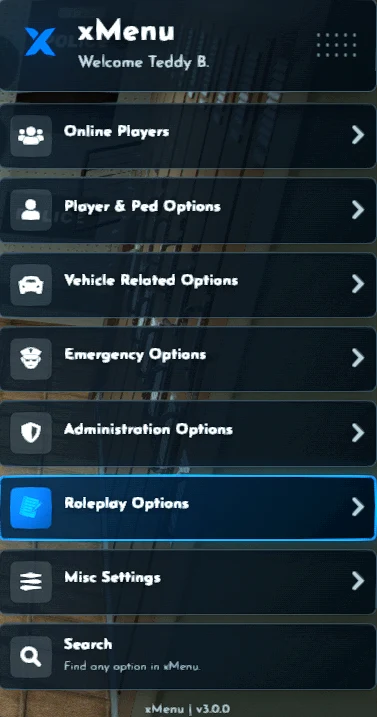
Roleplay Options
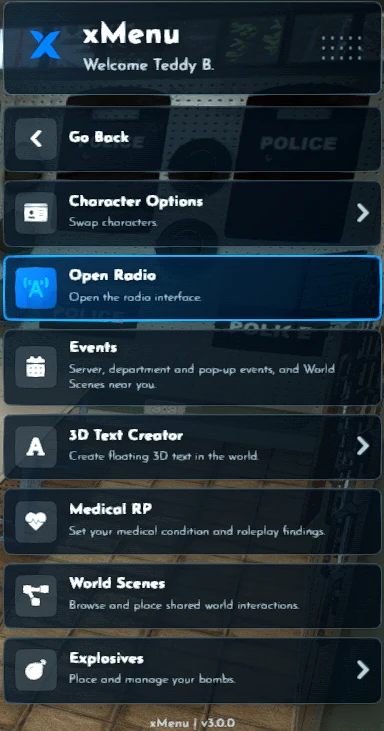
Open Radio


Article publishing info
Created: 9/27/2025, 10:25:49 PM
Updated: 10/30/2026, 8:30:12 PM
Published: 10/30/2026, 8:30:12 PM