Home
Server
Community
Discord
Tebex
Gameplay
Events
Map
Votes
Character Portal
Leaderboard
Badges
Releases
Community participation
Applications
Departments
Appeals
Information
Updates
Community Rules
Status
Support
Store
Sign In
Support Home
Getting Started
Joining the server
Character Creation
Inventory
Third Eye & Menus
In Game Vehicles
In Game Weapons
In Game Radio
How to be a PubCop
Choosing your character
Minimap & UI Settings
Spawning Weapons & Ammo
Loadouts & Clearing Your Inventory
Spawning Items
Creating a Custom Item
3D Texts & `/3ddo`
Using a Blindfold / Putting a Bag Over Someone's Head
Customising Your M Menu, HUD & Map
Changing World Interaction Prompts
Changing xMenu Appearance & Navigation
Changing Body-Worn Camera Quality
Changing HUD & Voice Name Settings
Changing Map Blip Settings
Changing Radio Sound Settings
How to switch to the Classic GTA Pause Menu
Inventory Sounds
How to switch map styles
Commands & Keybinds
Function Keys
Core Keybinds
Vehicle Keybinds
Game Commands
Vehicles
Spawning Vehicles
Saving Vehicles
Refueling Vehicles
Using the Vehicle Store & Test Drives
Store
Redeeming Packages
Credits
Compensation System
VIP Tiers
Personal Vehicles
Peds, EUP & Clothing
Clothing Editor
Sharing Outfits
Using Custom Peds
Departments
Staff Team
LEO Departments
San Andreas Fire Department
Certified Civilians
Script Dev Team
Asset Dev Team
Media Team
Support Team
Troubleshooting
UI Lag
Clearing FiveM Cache
Extended Texture Budget
CAD
Open CAD & Civilian Lookup
Changing Radio Sound Settings
Using the Quick Access Radio & RTO
Changing Body-Worn Camera Settings
Changing Loadout Settings
Using the Radio Manually
Report Writing
Utilizing Flock System
LEO Keybinds
Using Bodycams in CAD
CMS Use
How to switch map styles
How to select the GTA or BCRP Satellite Map to use in settings
KEYBIND
F4
Opens the Custom BCRP Portal Menu
COMMAND
/welcome
Opens the Custom BCRP Portal Menu
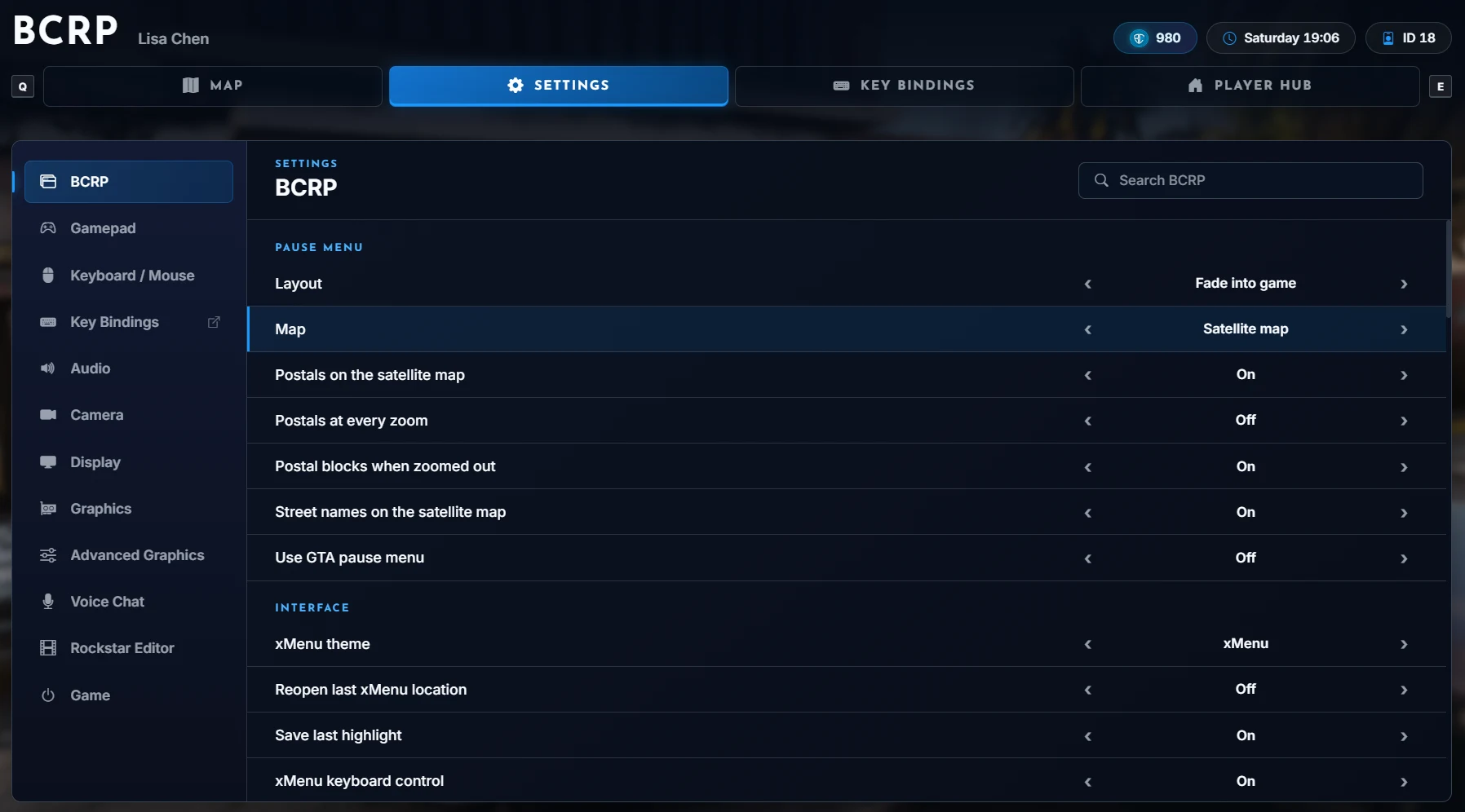
How to change Map Styles
First you are going to want to open the BCRP Portal using one of the Keybinds/Commands above
Next we are going to select the SETTINGS tab at the top of the Portal
Now once we are in the settings tab make sure you are in the BCRP Sub Section at the Left
You will then see the Second setting in that Section called “Map” you can change which map you use there
About the author
chplarper
Certified CHP Larp
View profile
About the editor
Landon
Buck is (not) the best.
View profile
Article publishing info
Created: 11/7/2026, 7:34:17 AM
Updated: 11/7/2026, 10:30:54 AM
Published: 11/7/2026, 10:30:54 AM
Confirm Deletion
Are you sure you want to delete this item? This action cannot be undone.