UI Lag
One simple trick to fix any UI lag you are experiencing
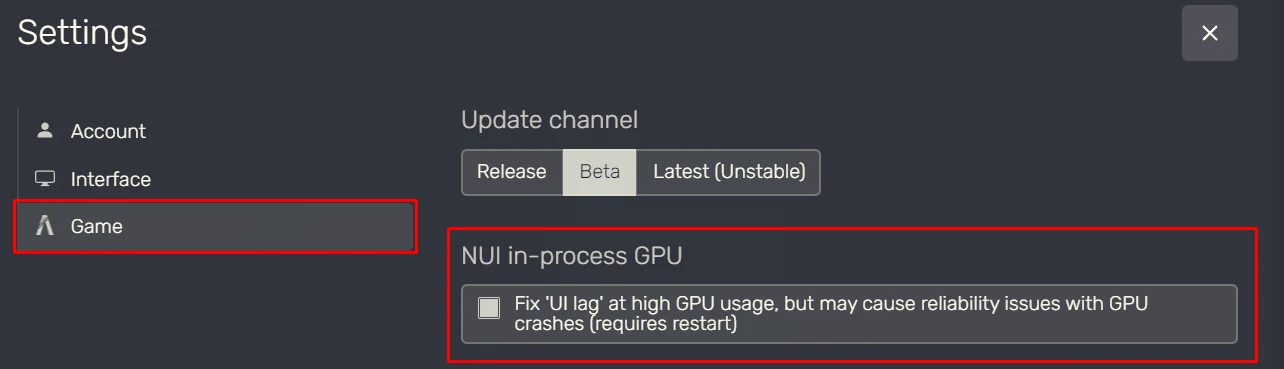
How to Fix UI Lag in FiveM
If your inventory, phone, or other menus feel slow or laggy, try changing this setting in FiveM.
How to fix it
- Open FiveM.
- Go to Settings.
- Select the Game tab.
- Find NUI In-Process GPU.
- Enable the option labeled “Fix ‘UI lag’ at high GPU usage”.
- Restart FiveM for the change to take effect.
What does this do?
This setting changes how FiveM uses your graphics card (GPU) to display menus and other UI elements.
It can help make menus smoother and more responsive, especially when your GPU is under heavy load.
Alternative
You can use the command below in the F8 console to skip the steps above but you STILL have to relog for it to take effect!
COMMAND
seta "nui_useInProcessGpu" "true"
⚠️ MUST be done in F8 console. ⚠️You STILL have to relog to make it work!
NOTE
This mainly helps with UI lag. It does not necessarily improve your in-game FPS or fix server lag.

Article publishing info
Created: 10/29/2026, 10:17:09 PM
Updated: 10/29/2026, 10:45:44 PM
Published: 10/29/2026, 10:44:20 PM