Customising Your M Menu, HUD & Map
You can customise a number of map, HUD and menu settings through the M / F1 Menu
Go to:
M / F1 Menu > Misc Settings
From here, you can change map blips, HUD behaviour, menu appearance, navigation settings and world interaction prompts.
Map Blip Options
Go to:
M / F1 Menu > Misc Settings > Map Blip Options
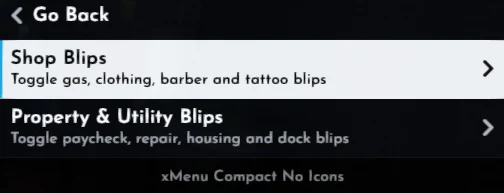
The categories include Shop Blips and Property & Utility Blips. Under Property & Utility Blips, you can toggle paycheck, repair point, house, and boat dock markers.
Turn markers off to hide them or back on when needed.
HUD Options
Go to Misc Settings > Interface Options > HUD Options.
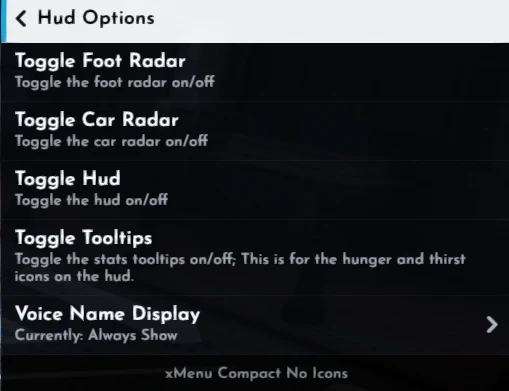
- Toggle Foot Radar: Show or hide the minimap while on foot.
- Toggle Car Radar: Show or hide the minimap while in a vehicle.
- Toggle HUD: Enable or disable the main HUD.
- Toggle Tooltips: Show or hide HUD tooltips, including hunger and thirst information.
- Voice Name Display: Choose when speaking players’ names appear.
Voice Name Display
You can choose between:
- Always Show — show player names whenever someone is talking
- Radio or Phone Only — only show speaking names while using radio or phone communications
- Always Hide — never show speaking player names
Context Menu Theme
Go to Misc Settings > Interface Options > Context Menu Theme to change the xMenu style.
Choose Original, xMenu (Recommended), xMenu Compact, or xMenu Compact No Icons.
Choose whichever layout you find easiest to use.
Screenshots shown with xMenu Compact No Icons
Navigation Options
Go to:
M / F1 Menu > Misc Settings > Interface Options > Navigation Options
Available settings include:
- Reopen Last xMenu Location — reopens xMenu at the submenu you previously closed
- Save Last Highlight — remembers the last highlighted option when reopening xMenu
- Toggle Keyboard Control — switches between mouse and keyboard control
